 SearchChamp
Site Auditor
Audit runs, health scores, and the Issues queue explained.
The Audits surface runs multi-engine crawls of your site, scores its health, and lists issues by severity.
Recent runs
Every run is saved with its Score (out of 100), issue counts, and how many were Fixed. Runs show as Completed or, for very large crawls that hit the time limit, Failed — a failed run offers Retry this audit with the same settings. Severity tabs (All, Critical, Warn, Info) summarize the current issue mix.
The Issues queue
Issues is the cross-page issue queue across all your runs. Filter by severity — Critical first — and each issue names the affected page and the run it came from, so you can drill into the source.
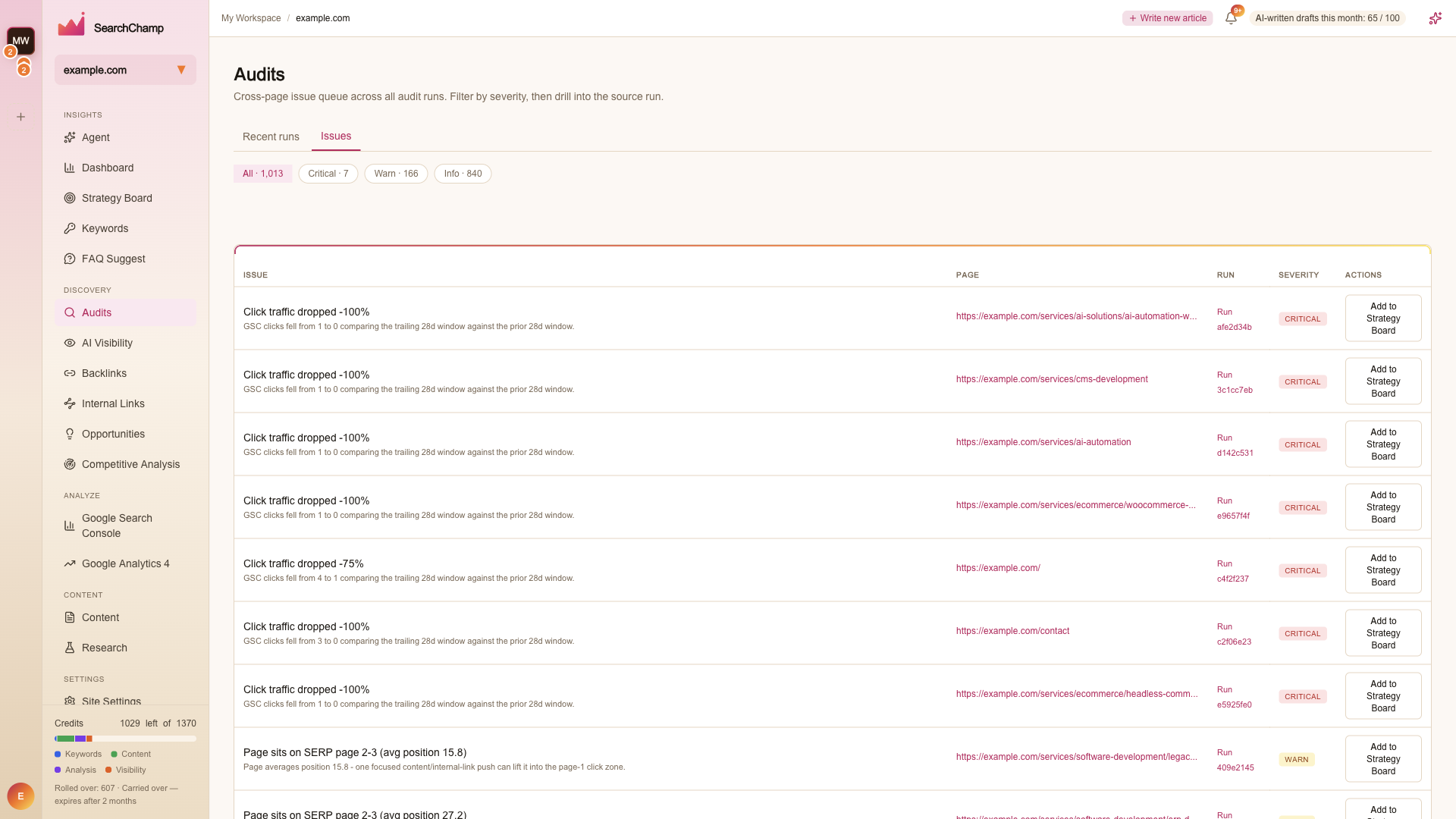
Each row states the finding in plain language with the evidence under it — for example Click traffic dropped -100% · GSC clicks fell from 1 to 0 comparing the trailing 28d window against the prior 28d window, or Page sits on SERP page 2-3 (avg position 15.8) · one focused content/internal-link push can lift it into the page-1 click zone.
Add to Strategy Board on any row turns the issue into planned work rather than leaving it in a queue you have to remember. See Strategy Board.
A run's own page also carries Fixed and Cannibalization views for that crawl.