 SearchChamp
Opportunities
Turn signals from your connected sources into prioritized actions for traffic, content, and authority growth.
Opportunities combines signals from connected sources and turns them into a prioritized list of actions. Use it to decide what deserves attention now, what can grow next, and what belongs in a longer-term plan.
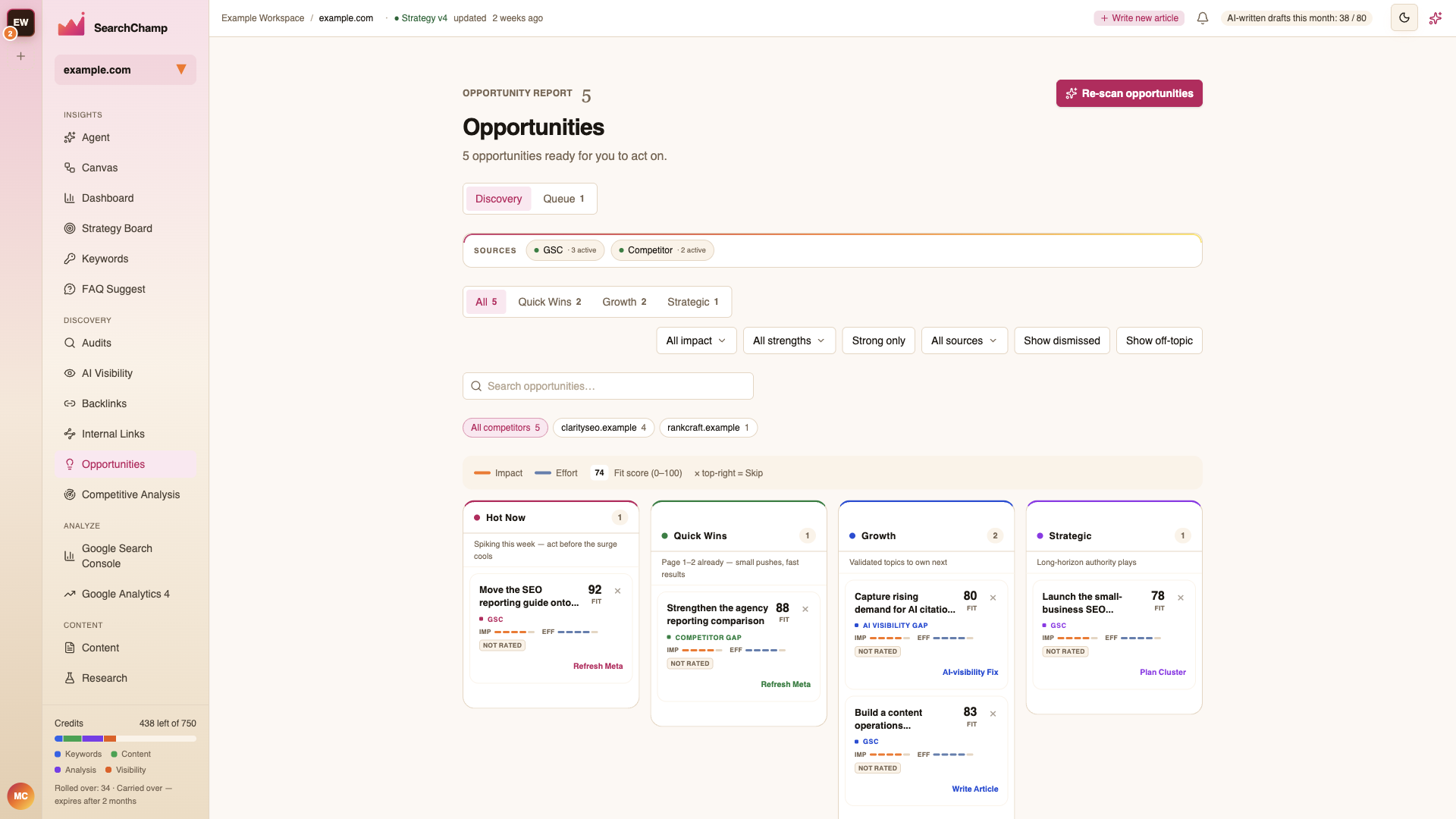
Read the Discovery view
The All view places populated cards in four lanes:
| Lane | Use it for |
|---|---|
| Hot Now | Time-sensitive demand or momentum worth acting on before it cools. |
| Quick Wins | Existing pages close to stronger results with a focused improvement. |
| Growth | Validated topics and gaps that can build the next stage of traffic. |
| Strategic | Larger, long-horizon authority plays that need deliberate planning. |
The count on each lane reflects the opportunities that match your current filters. When a lane is empty, it means no current item qualifies—not that the scan failed.
Understand an opportunity card
Each card combines several decision signals:
- Fit score — how well the opportunity matches your site and strategy, from 0–100.
- Impact — the likely upside if the work succeeds.
- Effort — the relative amount of work required.
- Source — where the signal came from, such as GSC, a competitor gap, or an AI visibility gap.
- Recommended action — the next useful workflow, such as Refresh Meta, Write Article, AI-visibility Fix, or Plan Cluster.
Choose a card to inspect its supporting detail before acting. Use the × in the top-right to skip a recommendation that is irrelevant.
Filter the report
Use the controls above the lanes to narrow by impact, recommendation strength, source, search term, or competitor. You can also reveal dismissed or off-topic items when reviewing earlier decisions.
The source health bar shows which connected sources are contributing opportunities. Re-scan opportunities runs a fresh pass across the enabled sources.
Discovery and Queue
- Discovery contains opportunities waiting for review.
- Queue contains the work you have committed to.
Queued items land in This Week's Plan with their evidence attached. Choose Open the plan to continue on the Strategy Board.
Trend Signals
Trend Signals appears separately below the opportunity lanes. These are external changes worth watching, rather than content-performance opportunities your site is already ranking for.