 SearchChamp
Feature ReferenceKeywords
Keywords
Your site's keyword set — the table, the filters, and where everything lives.
Keywords is your site's working keyword set. Everything else in SearchChamp — clusters, content briefs, rank tracking, AI visibility — starts from a keyword that lives here.
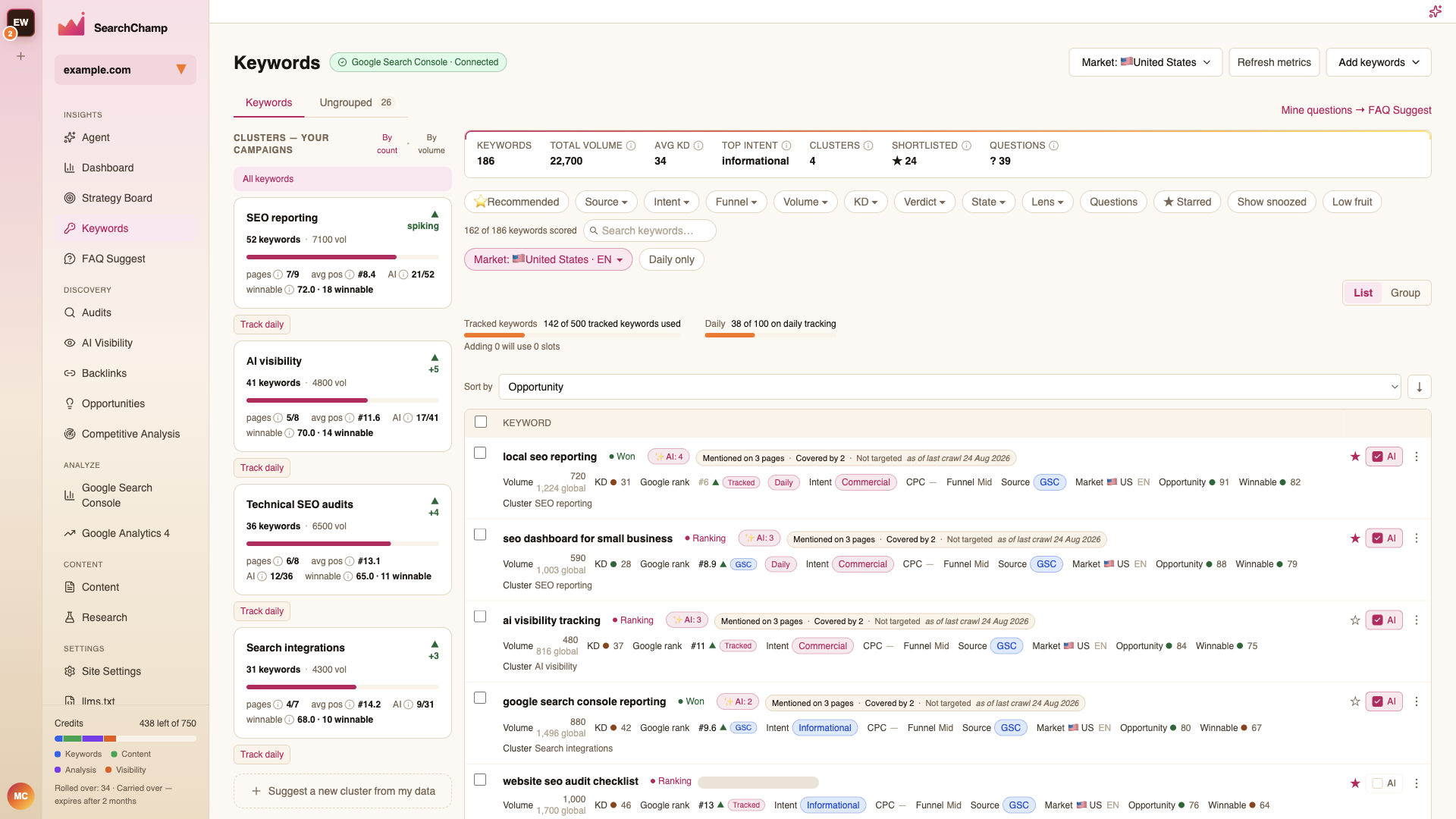
The summary strip
Across the top: Keywords (total in the set), Total Volume, Avg KD, Top Intent, Clusters, Shortlisted, and Questions.
The table
Each row is one keyword. The columns:
| Column | What it tells you |
|---|---|
| Volume | Monthly searches in the selected market, with the global figure beneath. |
| KD | Keyword difficulty, 0–100. Lower is easier. |
| Google rank | Your current position, if the keyword is tracked. |
| Intent | Informational, Commercial, Navigational, or Transactional. |
| Funnel | Top, Mid, or Bottom of funnel. |
| Source | Where the keyword came from — GSC, AI generate, CSV import, and so on. |
| Market | The country and language the metrics are for. |
| Opportunity | A 0–100 blend of volume, difficulty, and intent. Higher is a better bet. |
| Winnable | A 0–100 score of how weak the current SERP is. Higher means an easier win. |
| Cluster | The topic cluster the keyword belongs to. |
A badge on each row marks its state: Idea, Ranking, or Won.
Filters and views
- ⭐ Recommended — one click to show your easiest wins first (Easy-win verdict, sorted by opportunity).
- Filter chips — Source, Intent, Funnel, Volume, KD, Verdict, State, and Lens, plus Questions, ★ Starred, Show snoozed, and Low fruit toggles.
- Search — free-text search across the set.
- Sort by — Opportunity, Volume, KD, and more.
- List / Group — flat list, or grouped by cluster. See Clusters and grouping.
Per-row actions
- ★ — add to your shortlist.
- AI — track this keyword's visibility in AI answers.
- ⋮ — the row menu: snooze, add to a cluster, write content for it, and more.
Next
- Adding keywords — the six ways to grow the set
- Clusters and grouping
- Keyword detail
- Markets and tracking
- Winnable keywords
- Research keywords and pick targets