 SearchChamp
Markets and tracking
Choosing the country and language your metrics are measured in, and what daily tracking costs.
Keyword markets
A market is a country plus a language. Every volume, difficulty, and rank in the Keywords table is measured against the selected market — the same keyword can be easy in one market and impossible in another.
Market: in the top-right opens the picker.
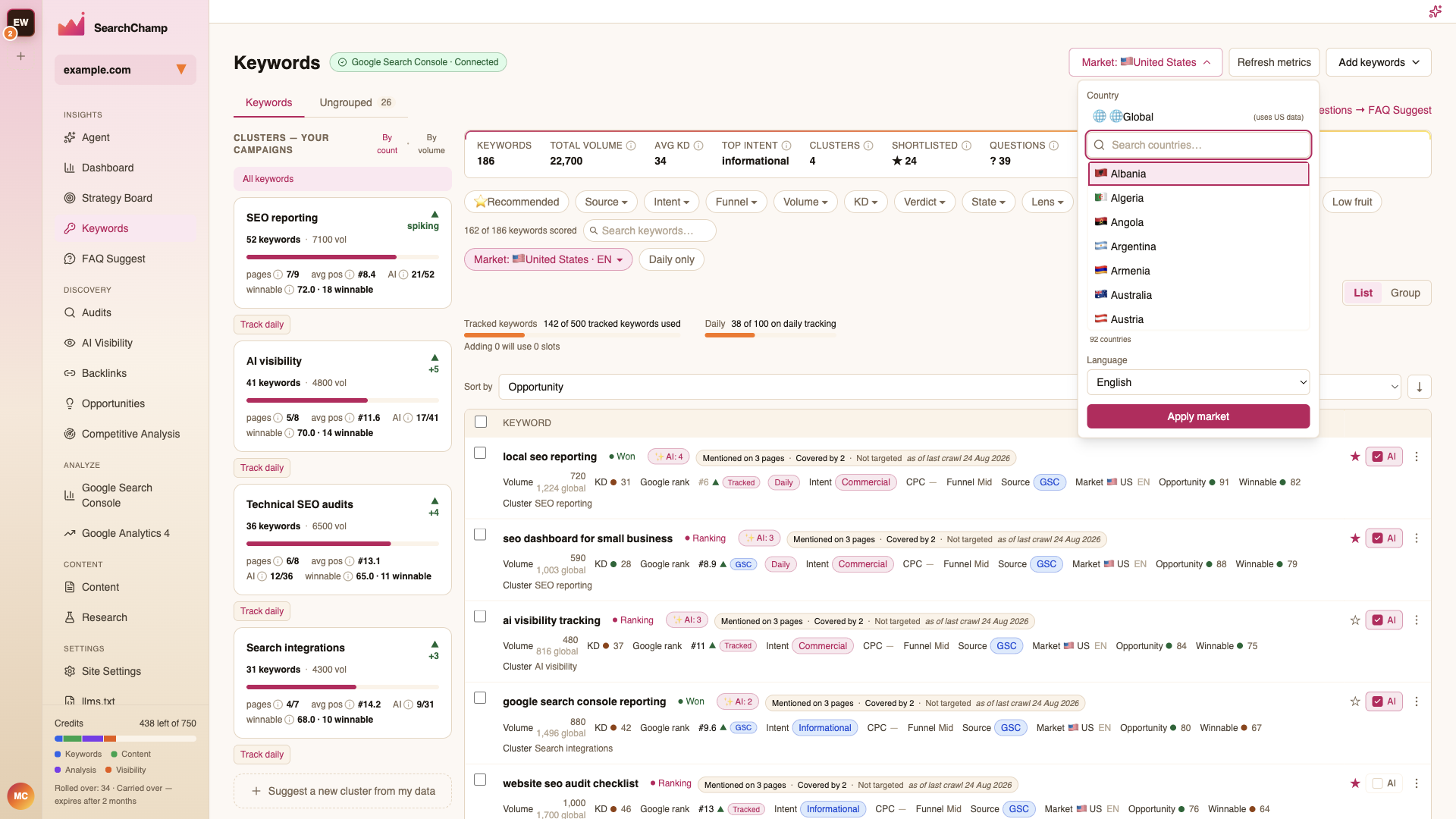
- Global uses US data as its baseline.
- Search the country list, pick a Language, then Apply market.
- The Market: filter chip above the table switches between the markets you've already created, without re-pulling anything.
Adding keywords in a market that doesn't exist yet creates it. See Adding keywords.
Refresh metrics
Refresh metrics re-pulls search volumes for the current market's keyword set. Volumes come from third-party data that updates monthly, so there's no benefit to refreshing more often than that.
Rank tracking
Two quotas sit above the table:
- Tracked keywords — how many of your plan's tracking slots are in use. A tracked keyword gets its Google rank checked on a regular schedule.
- Daily — how many of those are on daily checks rather than the standard cadence.
Before you add keywords, the line beneath tells you how many slots the addition will consume.
To put a whole cluster on daily tracking, use Track daily on its card in the cluster rail. The Daily only filter chip narrows the table to daily-tracked keywords.