 SearchChamp
Cluster detail
Explore a topic cluster's link graph, find orphan pages, and review ranked connection suggestions.
Open a cluster from Internal Links to see how its pages connect and where the strongest linking gaps remain.
This illustration shows an earlier interface. Use the current placement, count, and preview explanations in this article.
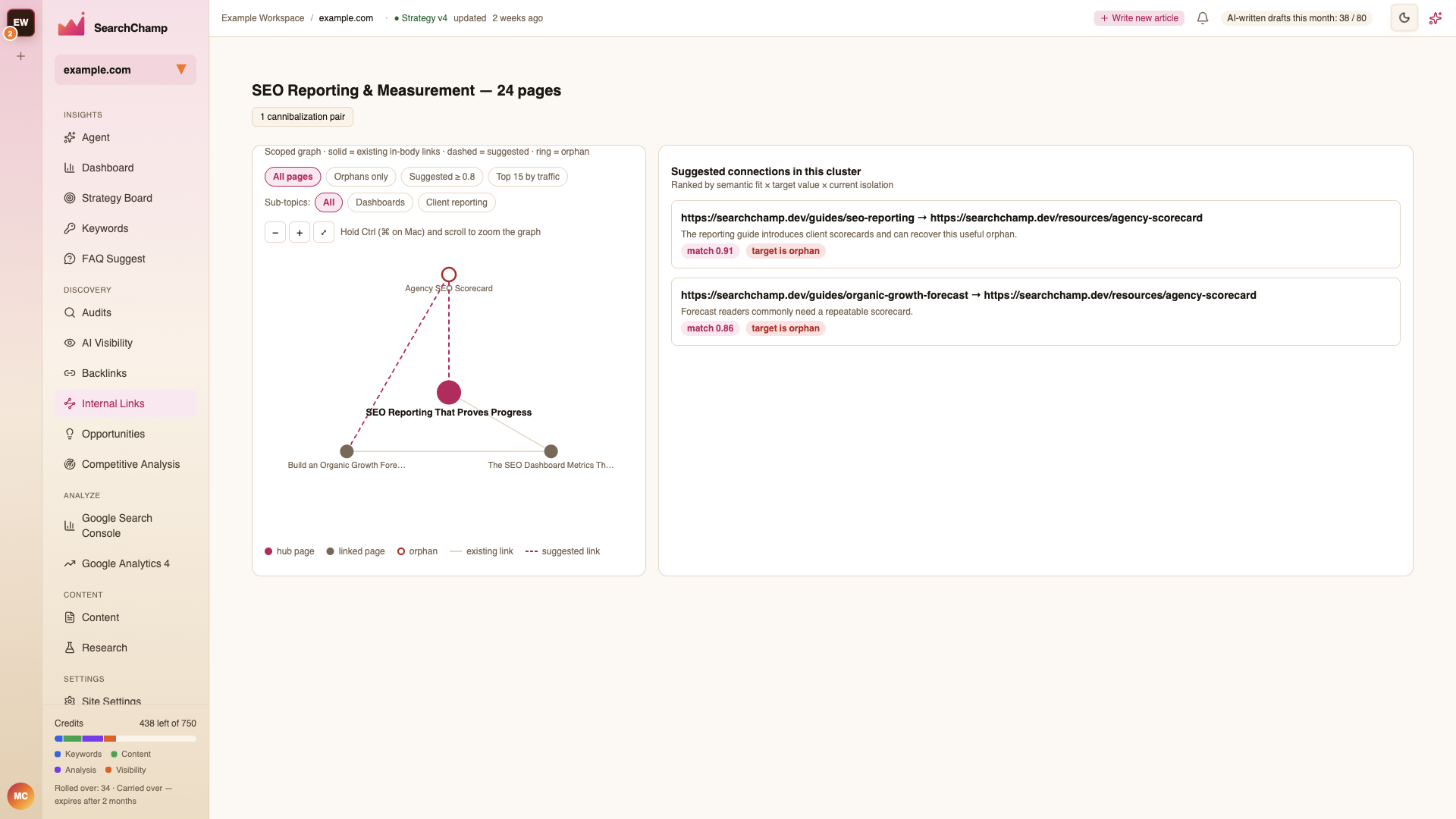
Read the graph
The graph is scoped to the selected topic cluster:
- A solid line is an observed contextual-content link.
- Dotted, short-dashed, and dash-dot layers show shared navigation, footer, and breadcrumb links.
- A long-dashed layer means placement is unknown. Use Observed placement to filter the layers.
- A dashed line is a suggested connection.
- A page with an orphan ring has no observed incoming link from another page in the saved site graph. A Nav only page is reachable through shared links and is not an orphan.
- The larger hub node represents the cluster's central page.
A source and destination can have several placement layers when the source contains several links. Node totals count distinct referring and destination pages across the saved site graph; drawn connections join members of this cluster. Contextual density counts distinct directed contextual pairs within the cluster and excludes self-links. Unknown density means the capture cannot support an exact contextual count; it is not zero.
Use the zoom controls to move closer, move out, or fit the full graph in view. You can also hold Ctrl or Command while scrolling to zoom.
Narrow the view
Use the filters above the graph to focus on:
- All pages — the complete cluster.
- Orphans only — pages that most urgently need an incoming link.
- Suggested ≥ 0.8 — higher-confidence connections.
- Top 15 by traffic — the pages with the strongest traffic context.
Subtopic filters isolate a smaller theme inside the cluster when the graph is crowded.
Review suggested connections
The list shows saved suggestions in descending confidence. Semantic fit, target value, and current isolation guide candidate selection; they do not mean the displayed confidence is their product. Each card explains the source and target pages, why they belong together, and the match score. The match score is a fit signal, not a forecast of search rankings. Review each proposed passage, anchor, and destination before deciding.
A shared menu link does not by itself rule out a useful contextual suggestion. Existing contextual duplicates are excluded; unknown or stale link evidence cannot certify that a pair is eligible. Inspect the proposed passage and destination before deciding.
Before applying a suggestion, check that:
- The target genuinely helps someone reading the source page.
- The recommended anchor describes the destination clearly.
- The target does not duplicate another link placed nearby.
Select a suggestion or page to continue in the page workbench.
Cannibalization pairs
A cannibalization badge means SearchChamp found pages that may compete for similar intent. Review the pair before strengthening both pages with links; you may instead need to clarify their roles or consolidate overlapping content.