 SearchChamp
Page workbench
Review an internal-link suggestion in context, then apply or dismiss it.
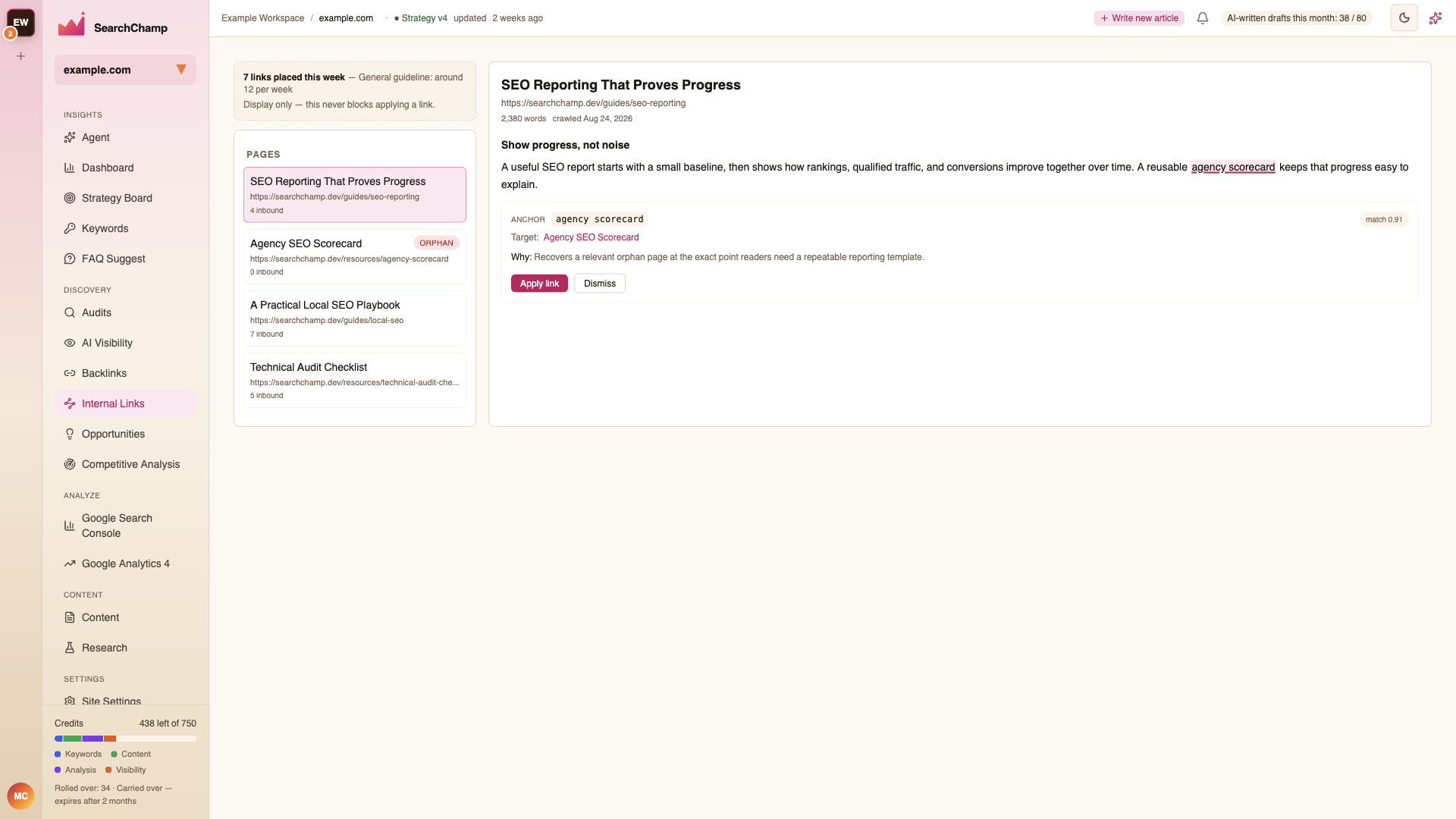
The Page workbench puts every suggestion beside the source copy, so you can judge the link in context before changing the page.
This illustration shows an earlier interface. Use the current placement, count, and preview explanations in this article.
Inspect observed links
The Observed link placement panel separates contextual content, shared navigation, footer, breadcrumb and unknown evidence. Use Placement and Direction to inspect inbound or outbound pairs, then page through the matching evidence.
Each captured anchor shows its source and destination URLs, anchor text, placement, a DOM path or surrounding excerpt, and the crawl time when available. Several anchors between the same two pages count as several anchor occurrences, but only one distinct referring page. A source can appear in several placement categories, so adding category totals will double-count it. Self-link occurrences remain inspectable but do not count as support from another page.
A link inside the main area is not automatically contextual. A service card or related-guidance link can be contextual when its surrounding content supports that connection. Use the saved passage to assess it.
The panel reports the saved corpus and capture freshness. Legacy, missing or incomplete evidence remains unknown, not an observed zero. A navigation-only status requires complete evidence; a stale capture or skipped clustering run does not prove the current live page has been rechecked.
Review a suggestion
Choose a page
Use the page list to select a source. The list shows each page's URL, incoming-link count, and orphan status so you can prioritize weakly connected pages.
Check the source context
The workbench highlights the proposed anchor inside the relevant section of the source page. Read the surrounding sentence and confirm that the anchor feels natural.
Verify the target
Review the destination URL, match score, and explanation. A match score is a fit signal, not a forecast of search rankings. A relevant destination can be useful even when other pages already link to it; confirm that this source passage adds a new contextual connection. Open the target if you need to confirm that it answers the promise made by the anchor text.
Apply or dismiss
Choose Apply link when the connection is useful and accurate. Choose Dismiss when the anchor, target, or context is not appropriate.
Understand pacing guidance
The banner at the top shows how many links have been placed this week and a general weekly guideline. It is informational only: it never blocks you from applying a link.
Favor a steady pace and editorial quality over reaching a number. A smaller set of genuinely useful links is better than adding links that interrupt the page.
If a page is unavailable
If the workbench says a page is not in the crawled corpus:
- Confirm the page is included in Corpus scope.
- Run or refresh the site crawl.
- Return after the page has been analyzed.
Automatic application depends on your plan and CMS connection. If it is unavailable, use the source context, anchor, and target details to make the change manually.