 SearchChamp
Internal Links
Find orphan and under-linked pages, explore topic clusters, and add useful links between related content.
Internal Links maps the relationships between pages in your site corpus. It groups related content into clusters, highlights pages that need stronger connections, and recommends links you can review before applying.
What you'll need
- A connected, verified site with a completed crawl.
- For automatic deployment: a connected CMS, such as WordPress. Without one, use the recommendation details to add the link manually.
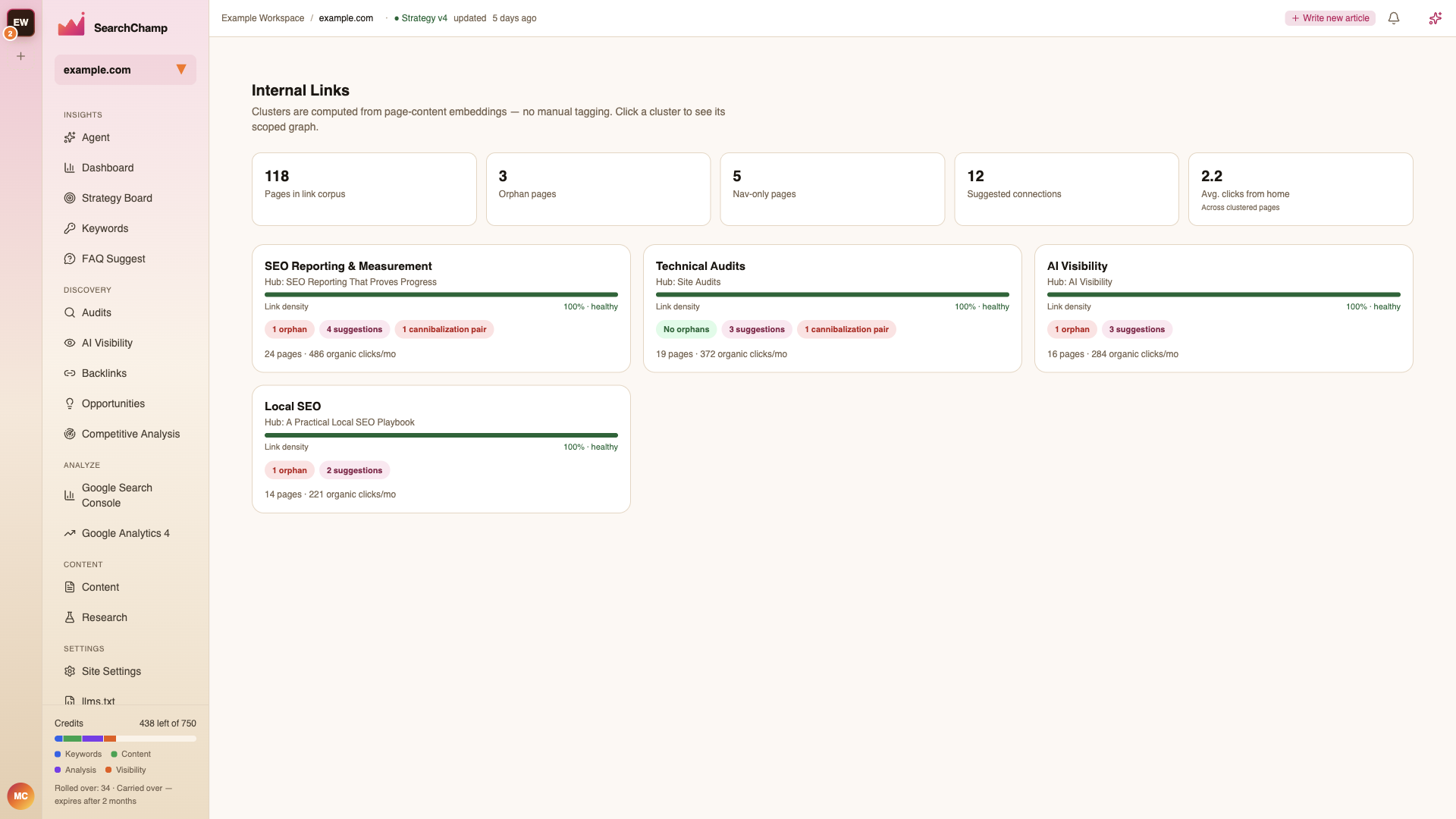
This illustration shows an earlier interface. Use the current placement, count, and preview explanations in this article.
Read the overview
The health strip summarizes the pages SearchChamp can analyze, the number of orphan and navigation-only pages, pending preview targets, and average click depth from the home page. Pending preview targets counts distinct destination pages at the last clustering pass. The cluster-card preview-target chips use the same snapshot. These counts can differ from the current pending previews in cluster detail or the page workbench after generation, application, or dismissal; a snapshot of zero does not mean those readers have no current previews.
Each cluster card shows a related group of pages and its likely hub. Use the card metrics to prioritize work:
- Link density — distinct directed contextual pairs within the cluster. Contextual density excludes self-links; unknown density is not zero.
- Orphans — pages with no observed incoming link from another page in the saved site graph. Shared navigation can make a page reachable without providing contextual support.
- Preview targets — destination pages with a pending preview at last clustering, rather than a current count of recommendation rows.
- Cannibalization pairs — pages that may be competing for the same search intent.
- Pages and organic clicks/mo — the cluster's size and traffic context.
Select a cluster to open its scoped graph and ranked recommendations.
The Internal Links pages
| Page | Use it to |
|---|---|
| Clusters | Compare the health of topic groups and choose where to start. |
| Cluster detail | Explore one cluster's link graph, filters, orphans, and suggested connections. |
| Page workbench | Review a recommendation in page context, then apply or dismiss it. |
| Corpus scope | Control which URLs are included in Internal Links analysis. |
| Link Opportunities (legacy) | Use the earlier page-and-suggestion workflow if it still appears in your workspace. |
Recommended workflow
Choose a cluster
Start with a cluster that has orphan pages, low link density, or several high-value suggestions.
Inspect the graph
Open the cluster and use its filters to isolate orphan pages or high-confidence suggestions.
Review the source page
Open a recommendation in the page workbench. Check the proposed anchor in context, the target page, and why the connection is useful.
Apply or dismiss
Apply recommendations that help readers move naturally between related pages. Dismiss suggestions that do not fit the sentence or user journey.